Source preview guide · 0.1.0
Authentication and exact authority
Connect the intended editor and browser, approve the matching request and keep source and repository grants separate.
Identify what needs access
CodeSecurity makes several independent decisions. Use the control that belongs to the access you need:
| Decision | What it permits |
|---|---|
| VS Code Workspace Trust | Lets the extension read, annotate and navigate source in that workspace. |
| IDE membership | Connects one exact editor profile and authority generation to the installation’s allowed IDE operations. |
| Browser membership | Gives one paired browser an operator session in the local workbench. |
| Source authorization | Makes an explicitly selected narrow source boundary available to scanners. |
| Repository-member approval | Allows the intended IDE generation to manage protection for one exact Git clone. |
A connected profile does not automatically authorize source or inherit another generation’s repository approval. The authority chapter follows these boundaries through the implementation.
Connect a pristine installation
Start the backend and open the intended repository in the intended VS Code profile. Run CodeSecurity: Get Started and review Workspace Trust.
On a pristine installation with no existing browser ownership, active IDE or consumed installer authority, the first eligible profile can claim the one-use owner authority. After trust, its integrated dashboard pairs through the supported flow. This path does not require generating or pasting an IDE secret.
If several new profiles start together, only the eligible first-owner request can claim that authority. The others remain pending for owner review. Once ownership exists, use the following approval flow instead of attempting to recreate a pristine state.
Approve another editor profile
- In the new profile, wait for Approval needed and its short verification code in the CodeSecurity status bar.
- Run CodeSecurity: Connect / Review IDE Access.
- In the already-authenticated owner’s external browser, open Settings > IDE access.
- Compare the pending request’s code, endpoint and recognizable editor/workspace name with the requesting profile.
- Approve only the matching request.
- Verify that the exact client becomes active and the editor status becomes connected.
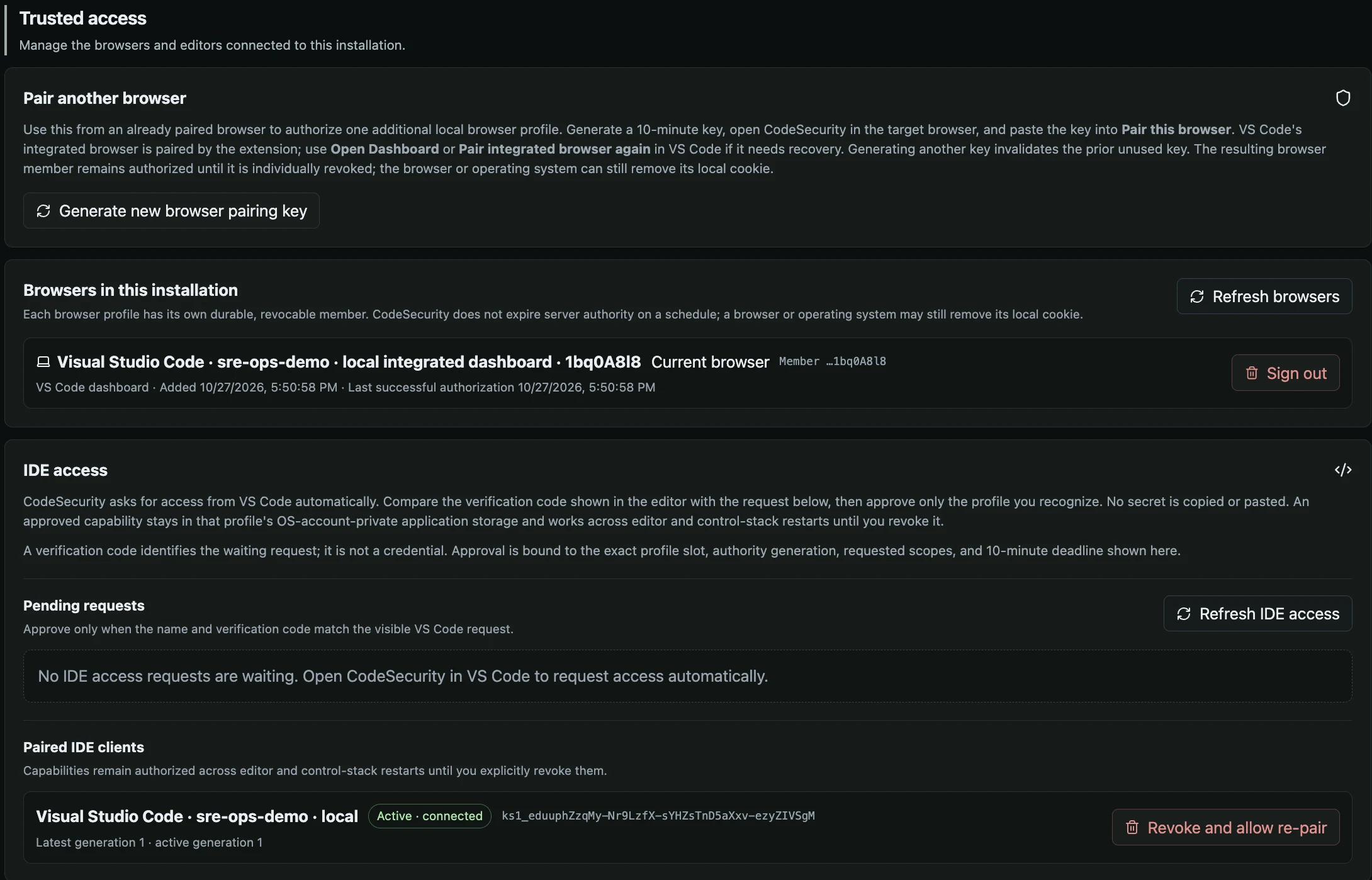
Browser membership and IDE access have separate records and revocation controls.
Open the full imageApproval activates the authority already retained for that profile, endpoint and generation. It does not issue a general-purpose API key. The profile reconnects across editor and backend restarts while that authority remains valid.
Use Refresh IDE access when the state is uncertain. Reject or Cancel applies to the matching pending request; Revoke applies to the intended active member. An older request cannot remove a concurrent replacement generation.
Open or add a browser
After IDE access becomes active in a trusted workspace, the extension attempts to enroll its integrated dashboard. Later Open Dashboard actions reuse the acknowledged browser membership.
Restricted Mode and explicitly ephemeral integrated-browser storage prevent durable dashboard pairing. The extension explains the required change instead of silently changing a browser setting. The IDE’s own membership and native findings are distinct from the integrated browser’s cookie and membership.
To add another browser, run CodeSecurity: Add Browser to Lomo CodeSecurity. The recommended choice copies a single-use, ten-minute pairing code for an unpaired local browser profile. The optional system-browser path also requires an unpaired profile. An already-paired browser is not replaced by that invitation.
Keep pairing values out of issue reports, screenshots, source files and editor settings. Do not copy a profile’s authority files into another profile.
Recover an owner browser
When no usable owner browser session remains, follow the pinned browser recovery workflow. make auth-info is the maintained browser-only startup and recovery entry point from the product checkout. It is not required for routine approval while an owner is already authenticated.
Treat its one-time value as a credential. Use the local pairing page and avoid recording it in terminal transcripts or shared logs. If the value was exposed or consumed, follow that workflow’s explicit reset steps; do not reset every client as a first response to a missing browser cookie.
Distinguish a failed read from an empty list
Settings shows loading until the first successful member read. No paired IDE clients means a successful empty result. A failure means the members could not be loaded.
A later failed refresh retains previously loaded clients and reports the error. Pending requests and active clients can fail independently: a successful active-client refresh can coexist with an explicit pending-request error. Reconcile both before making an access decision.
Repair only the affected record
Local authority corruption and a corrupt server membership row have different recovery actions. The extension’s local repair confirms the exact unchanged, proven-corrupt profile files. Settings’ Remove invalid record targets the exact invalid server row. Neither operation substitutes for the other or silently resets the installation.
Changing lomoCodeSecurity.apiBaseUrl requires connection to the intended origin again. A different port is a different origin. Preserve the old installation and profile while resolving the mismatch; use recovery when the destination or member identity is unclear.
Read the protocol with the right client
Browser sessions use an HttpOnly, SameSite cookie. Mutations also require the exact control Origin and a session-bound X-CSRF-Token. IDE capabilities use a narrow route allowlist, followed by route-specific ownership checks. Project creation authority does not imply unrestricted project reads.
Credentials do not belong in URL query strings. This website does not proxy product requests or collect pairing values. The authentication reference and IDE source operations document the request contracts for the relevant client.