Source preview guide · 0.1.0
Recover while preserving the original outcome
Find the affected connection, authority, source, scanner or job boundary and use its recovery action without replacing installation identity.
Keep the identity of the work
Begin with the visible error and the resource it names. Retain the installation state, endpoint, editor profile and any project, scan, job or command identifiers. A new state directory creates another installation; it does not recover the old one’s members or results.
A failed read is different from an empty result. Findings, Settings and Jobs retain previously loaded information when a later refresh fails. That retained view is useful context, but a fresh successful read is needed before you rely on a current outcome.
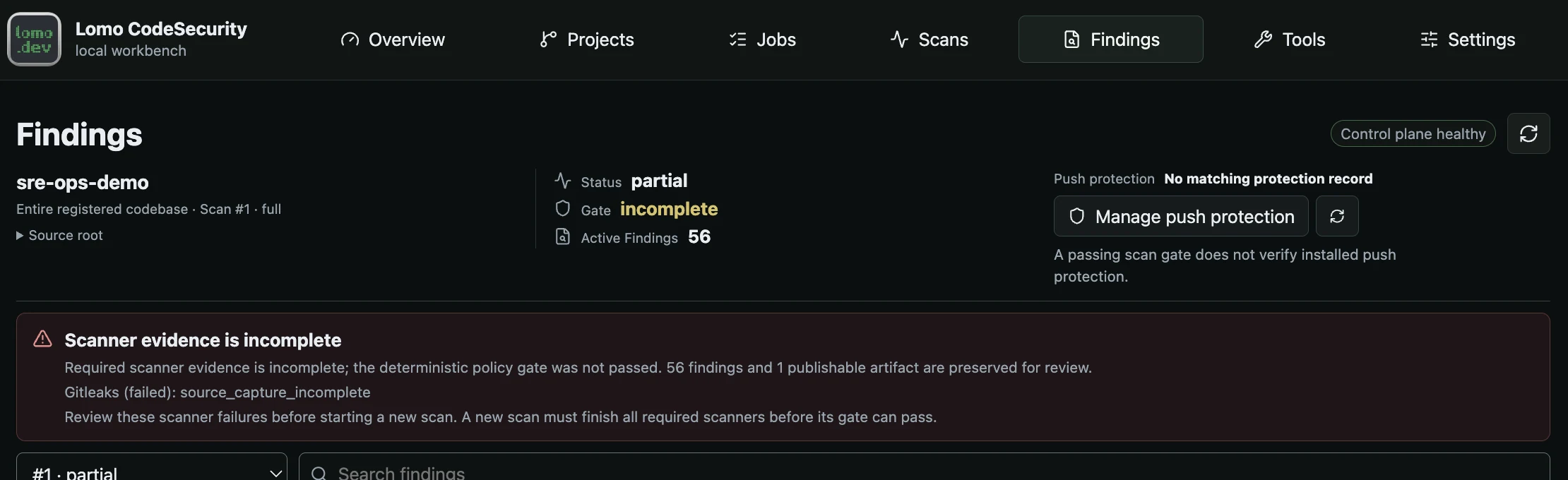
Use the reported cause to choose the next action. An incomplete operation is not a passing result.
Open the full image| Symptom | First action |
|---|---|
| Editor cannot reach the service | Confirm the intended loopback endpoint and backend, then use Reconnect to Local Service. |
| Editor shows approval needed or revoked access | Use Connect / Review IDE Access and inspect the exact request in the owner’s browser. |
| Repository is visible but cannot be scanned | Review source authorization and scanner readiness in Projects > Scan setup. |
| Scanner data is missing, expired or invalid | Inspect Tools and the preparation job; use the offered maintenance action. |
| Work remains queued | Inspect worker health and the existing job before submitting another command. |
| A save or submission timed out | Reconcile the original resource or job before repeating the action. |
| A push is blocked | Read Git output and the exact clone’s outgoing check. |
Restore the intended connection
Confirm lomoCodeSecurity.apiBaseUrl points to the installation you mean to use. Its default is http://127.0.0.1:8080; another port is another origin. Changing it requires connection to that destination again. The extension does not send the old origin’s authority to the new one.
Use the supported source startup with the same installation state. When the service is available, Reconnect to Local Service retries the existing profile connection. If membership was revoked or is no longer active, use Connect / Review IDE Access instead. Reconnect does not approve a member or grant source access.
For an unavailable owner browser, follow the authentication recovery flow. Keep any one-time value private. A missing browser session does not justify copying editor credential files or recreating all clients.
Native Windows automatic startup has a documented private-storage verification timeout issue in the public preview. A successful manual refresh is not proof that automatic startup is repaired. Consult the pinned release status for platform-specific limits before treating a workaround as acceptance.
Repair only the damaged authority record
The extension’s local repair action confirms exact unchanged profile files that are proven corrupt. The owner’s Remove invalid record action in Settings targets an invalid server membership row. These are separate operations: one does not silently perform the other.
Preserve unknown or changed files for diagnosis. Do not copy another profile’s authority, loosen directory permissions or remove every record to bypass the reported condition. Re-enrollment creates a new generation, so clone-specific push protection must be approved and applied again for that generation.
Reconcile source and stale editor evidence
Repository selection, registration and host authorization are separate. Review the exact narrow root offered by the product and apply only the intended source authorization. Adding a folder to VS Code or choosing a child repository does not authorize a broader parent.
After editing, renaming or deleting source, earlier diagnostics may be marked stale or removed. Save the intended content and rescan the exact file, folder or repository. Refresh Findings reloads existing results; it does not scan changes. Unsaved buffers are not scanner inputs.
If an exact-file rescan cannot establish the canonical source target, resolve the source context instead of substituting a similarly named file. Historical committed-tree findings remain tied to their recorded tree.
Recover scanner readiness
Open Tools and inspect each required component. During Verifying, wait for the content check to finish. Readiness warnings and hard expiry are different: the reviewed data uses a seven-day refresh warning and a fourteen-day hard validity window. Source-owned immutable rules follow their reviewed lock rather than an invented age threshold.
Use Prepare all scanners for the normal complete preparation flow. A component marked requires_lock_refresh needs refreshed reviewed source and its data lock; repeating a download under the same expired authority cannot repair it.
Use the action that matches the failure:
- Retry verification repeats an eligible failed observation of the unchanged cache target. It downloads nothing and cannot repair invalid bytes.
- Check cache outcome inspects an uncertain publication through a separate bounded read-only job. The original preparation remains failed.
- Roll back cache, under Advanced scanner maintenance, selects an eligible previous-good generation only if content, authority, compatibility and freshness still pass. It does not bypass expiry or change scanner image binaries.
Normal full preparation can replace a damaged sole selected generation when its pointer remains valid, no previous-good generation exists and all six data/rule components are requested. Enough space is required for the complete replacement while retaining the old data. Unsafe layouts, malformed pointers and partial repairs fail closed. Preserve the evidence instead of manually changing generation pointers, ownership or permissions.
The scanning guide explains preparation and coverage. A limited scan remains partial; it is not a recovery shortcut to a passing complete gate.
Rejoin uncertain jobs and saves
Reopen Jobs, find the original task and refresh it. If work processing is unavailable, use make up from the product checkout, wait for worker health and recheck the same job. Retry only an eligible terminal task that exposes Retry.
For Settings, restore the connection and use Reload Settings. Edited sections retain their drafts while untouched sections load current values. An uncertain save may already have reached the backend, so compare the saved state before submitting again. A revision conflict requires a new decision against the current values.
Cancellation is also an outcome to reconcile. Wait for terminal cleanup; closing a page does not cancel work, and cancellation does not undo already published scanner data or recall remote Advisor content. The jobs guide covers these distinctions and API idempotency.
Interpret an API error in context
Control validation errors use a sanitized detail array with type, loc and msg, omitting submitted values. Other errors can use a string or structured problem detail. Read the exact operation’s response contract.
| Status | What to check |
|---|---|
400, 411, 413 |
Request shape, host, URL and body or snapshot limits. |
401, 403 |
Member, origin, CSRF and operation-specific authority. |
404 |
Current resource identity and collection. |
409 |
Current revision, binding or command state. |
422 |
Field validation and source-defined semantic requirements. |
429 |
Authentication, stream or job capacity and required backoff. |
500, 502, 503, 504 |
Service readiness and the original job’s possibly uncertain outcome. |
The API reference links route-specific errors to source. This table is a recovery aid, not a claim that every route returns every status.
Preserve evidence for support
Record the public source revision, platform, affected operation, non-secret resource identity, expected behavior and minimal synthetic reproduction. Review diagnostic output before sharing it. Exclude runtime credentials, cookies, pairing values, private repositories and unreviewed logs.
The installation keeps durable database state and supported redacted artifacts separately from temporary scanner output and recovery spools. Read the pinned persistence guide before storage recovery. Use support for product questions and the security reporting channel for a possible vulnerability.