Lomo CodeSecurity / 0.1 source preview
An SRE workbench.
Evidence before action.
Review code, secret, dependency and infrastructure findings locally, with explicit control over source access. Follow the evidence in VS Code and check the history intended for a protected push.
Build the backend and extension separately. Marketplace publication is pending. Check platform coverage.
SOURCE / EVIDENCE / DECISION
From a reported line to a deliberate push.
A scanner report starts the review. Follow the finding to its source, decide how to handle it and check the committed history for the intended remote.
Find the line that matters.
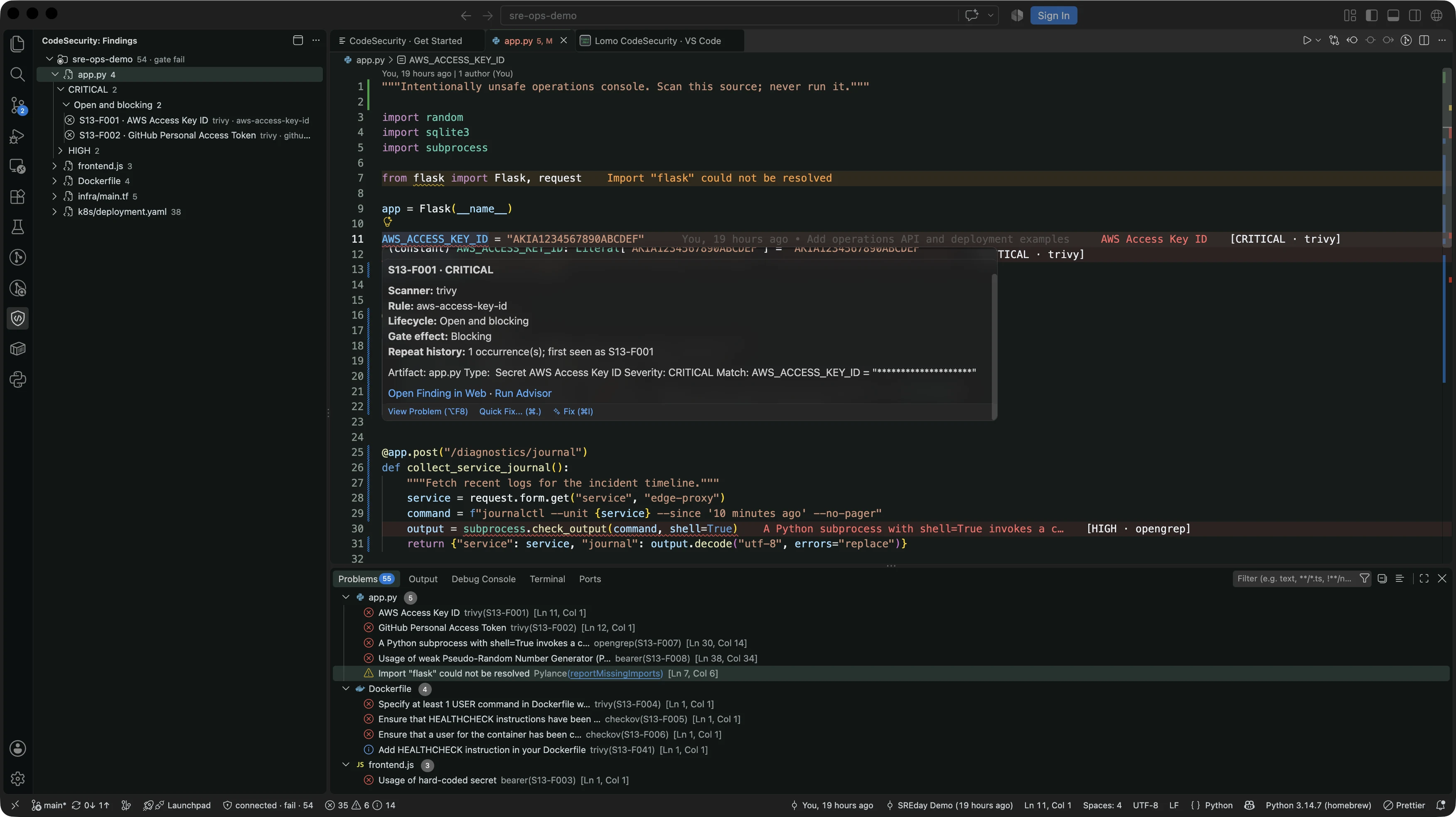
Move from a sidebar item, code hover or Problems entry to the finding and its evidence. Keep the selected repository and scan in view while reviewing the source.
Review findingsUse a second reading when it helps.
Optional Advisor can explain one finding through local Ollama or an explicitly authorized remote Ollama endpoint. Review the disclosure before a remote request and check the advice against the source. Advice never decides the gate.
See a saved Advisor reviewCheck the history you are sending.
The next decision concerns the commits being sent, not just the files open in the editor. Apply protection to the intended clone, then review its outgoing-history check.
How push protection works
FINDINGS / LOCAL WORKBENCH
Keep the context in view.
Read the location, scanner, severity and bounded evidence together. Record a reasoned disposition, then inspect its effect on the gate. Marking a finding fixed does not verify a code change; a new scan provides new evidence.
Review a finding >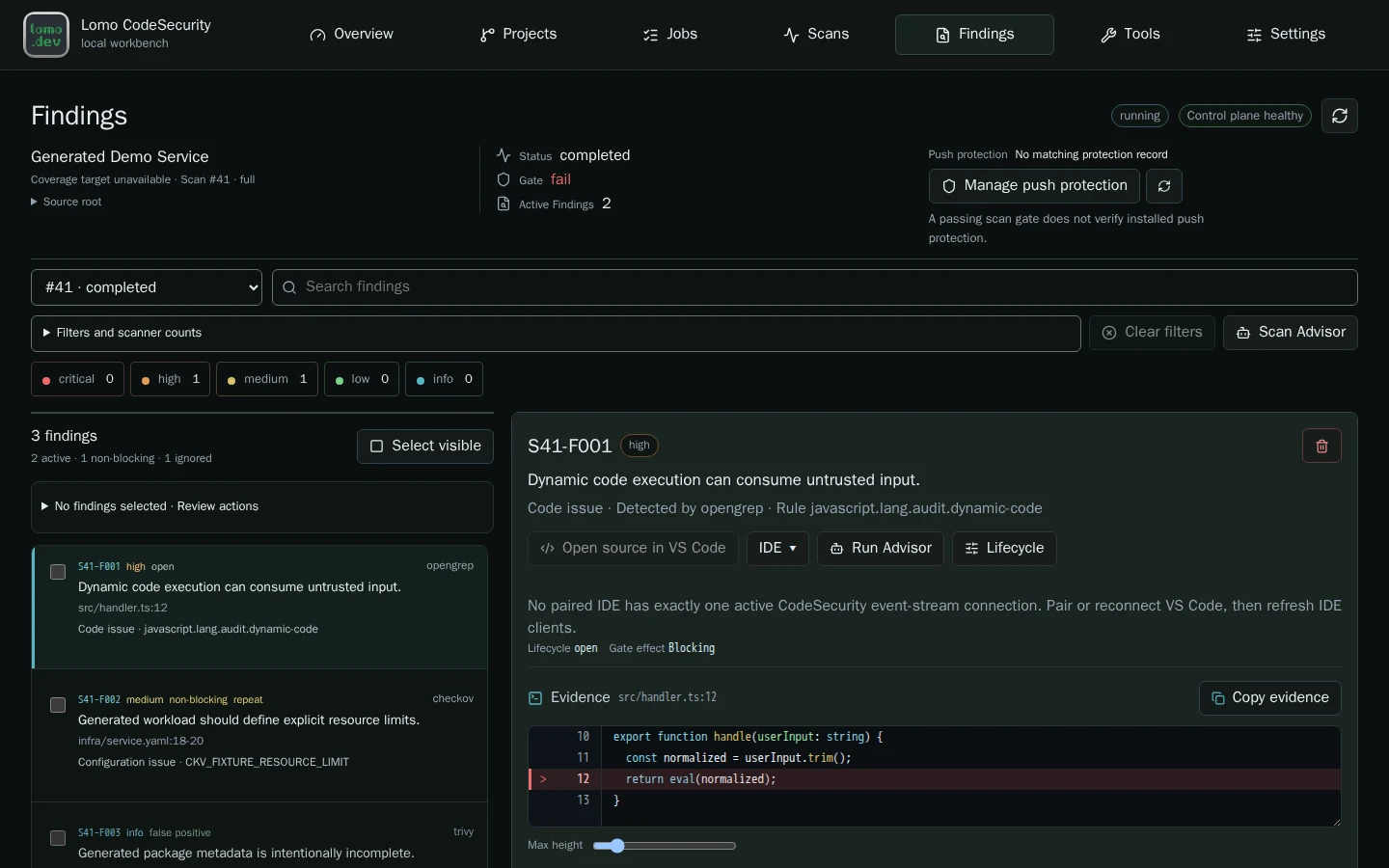
PRE-PUSH / CHECK COMMITTED HISTORY
A clean tip is not the whole history.
A secret added and removed in earlier outgoing commits still travels to the remote. The local hook checks outgoing source trees against current scanner evidence and policy. A completed scan can still fail that policy.
Installing the extension or scanning a workspace does not install protection. You choose the thresholds and approve the hook for each clone.
Read the gate contractEight complementary security tools
Different tools. One place to review.
Combine checks for code, secrets, dependencies and infrastructure with a software inventory. Each tool contributes a different view, with its own coverage and license. Ordinary scans do not use AI.
Tool roles, versions and limits- Trivy
- Vulnerabilities, secrets and infrastructure
- Gitleaks
- Secrets
- OpenGrep
- Application security
- Bearer
- Application security and privacy
- Grype
- Dependency vulnerabilities
- Checkov
- Infrastructure configuration
- TruffleHog
- Secrets, without network verification
- Syft
- Software bill of materials
YOUR CODE / YOUR CHOICE
Authorize each repository.
Source access starts with an explicit choice. Permission for one repository does not include its parent or neighbours; editor connection and push protection have separate approvals.
Scans run offline after the required data is prepared. A separate updater downloads scanner data without project-source mounts. Findings and short source excerpts are redacted before local storage.
Redaction cannot recognize every secret. CodeSecurity is not a sandbox for hostile repositories, and a passing scan does not guarantee secure code.
Read the security boundariesOPEN SOURCE / SRE PRACTICE
A foundation to build on.
Local operation, privacy and evidence before action shape CodeSecurity. Study how explicit source access, durable jobs, scanner coverage and deterministic policy fit into an SRE workflow.
Build on scanner adapters and rules, finding presentation or editor workflows through reviewed source changes, tests and a rebuild. The guides explain the concepts; the API reference connects the contracts to their implementation.
Something to fork after the talk.
CodeSecurity brings a practical open-source project to the SREday conversation: local security review, deliberate access and checks around outgoing Git history.
Try it on a test repository, inspect the implementation and share what could work better. A useful patch can start with a small annoyance.
The talk: Securing the Vibe Coding Era: Local-First Security Gates for AI-Generated Code
Explore the project on GitHubGETTING STARTED
Build it on your machine.
Check the platform requirements, build the source preview and begin with a test repository. Follow one finding before adding push protection.
Public source: 0.1 source preview · 0b47fd8. Check platform and release status