0.1 source preview
Build locally.
Connect your editor.
The backend and VS Code extension are separate components. Start the local backend, build the VSIX and connect the profile you already use.
Marketplace publication is pending. Mac ARM64 and Ubuntu AMD64 have scoped functional acceptance; Fedora is partial, and Windows native and Remote WSL are experimental. Read the platform limits.
Before you start
Check the prerequisites.
- Backend
- Python 3.12+, Git, Make, a local Linux Docker engine, Compose and Buildx. The launcher requires the reserved default builder with one running Docker-driver node on the same engine.
- Editor
- Official desktop VS Code 1.135+ for the extension. Version floors are requirements, not a promise that every newer version is qualified.
- Extension build
- Node.js and npm. The documented build accepts stable Node 20.18.1+ on 20.x or 22+; Node 21 and prereleases are excluded. The setup guide recommends an LTS release 22 or newer.
- Storage and network
- A fresh build needs network access and 32 GiB free on both source/state storage and Docker build storage. A matching-image restart has a separate 2 GiB floor. These are admission floors, not measured steady-state usage; scanner preparation checks cache space separately.
Read the platform-specific setup instructions before installing dependencies. Keep the backend checkout separate from the repositories you plan to scan. The launcher checks prerequisites; it does not install or reconfigure them.
Start the backend.
On macOS or Linux, run these commands from the directory where you keep source checkouts. The checkout command pins the public revision documented by this site.
git clone https://github.com/lomolabs/lomo-codesecurity.git
cd lomo-codesecurity
git checkout --detach 0b47fd8e14640155435de01c499260fe466c8e1e
python3 scripts/start-lomo.py --check --json
python3 scripts/start-lomo.py
The --check command never downloads its storage-probe image. On a pristine engine, engine_storage_probe_missing means normal startup needs to obtain that pinned dependency first. For other failed checks, follow the report's recovery guidance.
Normal startup builds and starts the backend. Its default address is http://127.0.0.1:8080. It does not open an editor or install the extension. Repeating the startup command retains installation data and pairing and reuses matching builds.
Add the extension to VS Code.
From the same reviewed source checkout, with Node.js and npm available:
make vscode-packageIn your existing profile, run Extensions: Install from VSIX… and select:
.kodesec-test/vscode/code-security-0.1.0.vsixOpen your project and run CodeSecurity: Get Started. The extension ID is lomo-dev.code-security. Installation does not start the backend or replace your other extensions.
Review Workspace Trust normally. The first eligible profile uses the installation's first-owner connection flow. Additional profiles need owner approval in Settings > Trusted access > IDE access, using the displayed verification code and profile name. No access secret needs to be pasted into the editor.
Complete the first local review.
- Authorize the source. Select an individual repository and review its narrow authorization. Selecting a child never grants its parent or siblings.
- Prepare scanners. Choose Tools > Prepare all scanners. Wait for the enabled scanners to be ready. The separate updater verifies data and rules without access to your source.
- Scan and review. Scan the repository, folder or supported file. Use Findings, Problems and Open Finding in Web to inspect results and coverage. An empty finding list does not establish complete analysis, and a completed scan can fail its policy gate.
- Choose protection. Review thresholds and use Protect Pushes… to approve and apply protection to that clone. Check Outgoing Commits… checks the committed history you intend to push.
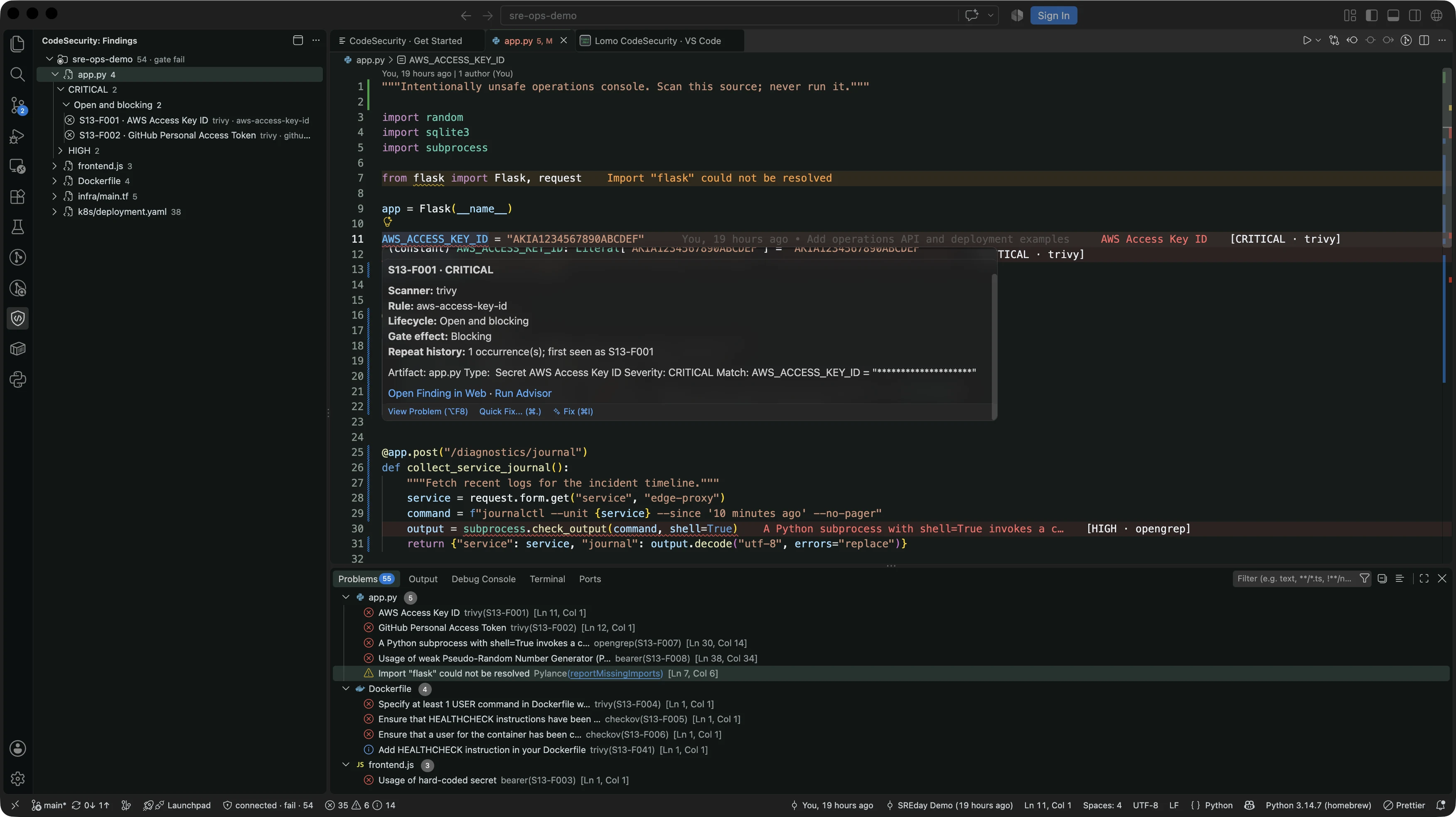
A real scan of deliberately unsafe, synthetic SRE examples in VS Code. Start at the reported line, open the finding from its VS Code hover and inspect the source evidence in the workbench.
A workspace scan alone does not install a hook. Incomplete, cancelled, failed or stale evidence cannot authorize a protected push. Local hooks can be bypassed with --no-verify or another clone; use remote branch controls for unavoidable enforcement.
Keep the source and scanner data current.
The pinned revision makes these instructions inspectable. Its bundled scanner definitions have a limited lifetime. When definitions expire, obtain newer reviewed source, run normal startup to rebuild changed inputs and prepare scanners again. Downloading the same expired definition does not renew it.
Preserve owner-private runtime state and Docker named volumes during updates. Backup and restore helpers are not a validated disaster-recovery facility. See scanner maintenance and data persistence.
Setup source: 0.1 source preview · 0b47fd8. Check platform and release status