Source preview guide · 0.1.0
Authorize source and submit a scan
Select the exact source, prepare the enabled scanners and distinguish a complete result from limited coverage.
Give each source a clear boundary
Start with the directory you intend to review. Adding it to VS Code or choosing it as a repository context changes editor membership, not scanner authority.
On Projects, use Authorize another source root when the directory is outside the configured read-only roots. Review its exact path, choose Copy host command, then run that command from the backend source checkout. The owner-only host helper applies the narrow boundary while preserving existing roots and installation data. The API does not have a Docker socket.
After the host applies the change, register the directory with Add Project. Do not authorize /, a home-directory collection or a broad common parent just to reach independent repositories. An out-of-root choice is refused before a project or scan is created.
POSIX and Remote WSL use authorized read-only mounts. Supported native Windows paths use bounded sealed snapshots. The scanning architecture explains the two transports and their shared source identity checks.
Read Scan setup before submitting work
Select the project and inspect Scan setup. Its three checks cover core services, source access and scanner data. Each missing prerequisite has a corresponding recovery action. The normal scan form becomes available when those checks are ready.
A successful health response establishes liveness. It does not establish that the selected source is mounted, that all enabled tools are ready or that a scan has complete coverage.
Prepare the enabled scanners
Open Tools > Prepare all scanners once. The workflow checks the reviewed catalog, downloads required databases or rules through the separate source-blind updater, then verifies the selected inputs. Preparation does not read project source.
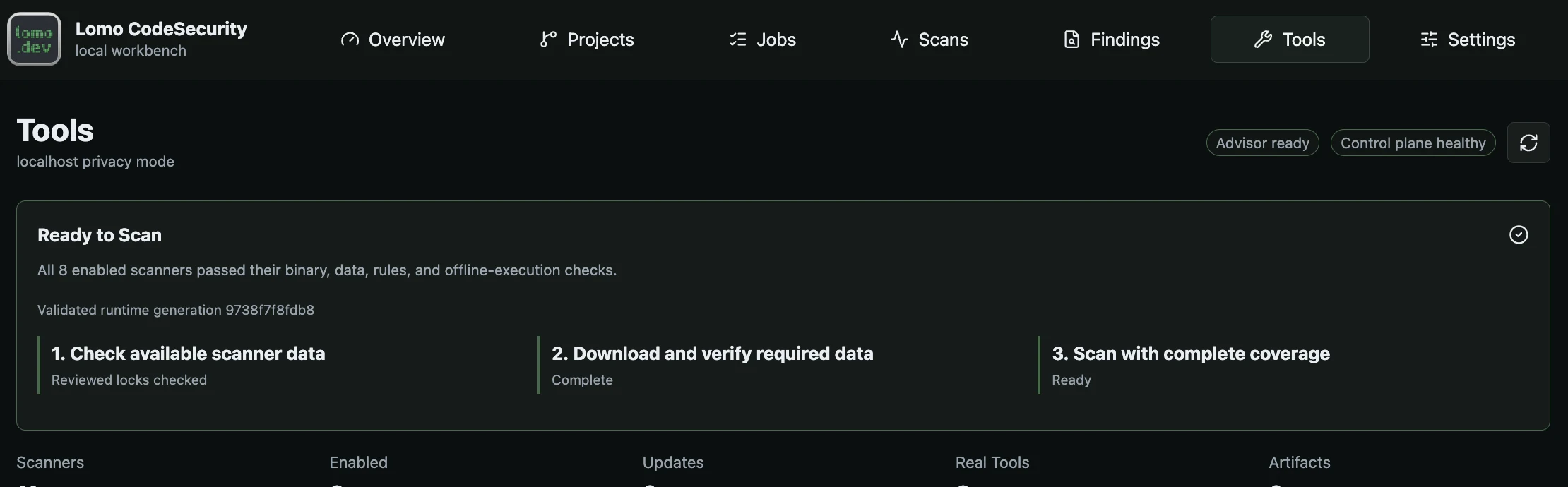
Prepare scanners checks reviewed data before a complete scan can start.
Open the full imageThe external tool set covers complementary jobs:
| Tools | Main role |
|---|---|
| Trivy, Gitleaks and TruffleHog | Secret detection, with Trivy also checking vulnerabilities and configuration. TruffleHog network verification is disabled. |
| OpenGrep and Bearer | Static application security and privacy rules. |
| Checkov | Infrastructure configuration checks. |
| Syft and Grype | Software inventory followed by dependency vulnerability analysis. |
When Grype is enabled, it depends on the sanitized Syft inventory from the same scan. Internal heuristic fallback tools are separately labelled and do not replace the external tools’ coverage.
Follow preparation in Jobs. A stage, component, last-activity time or byte count describes observed work. An indeterminate indicator does not imply a hidden percentage or completion estimate.
Mutable reviewed databases and downloaded checks warn after seven days and expire after fourteen days, measured from their source-defined timestamps. Immutable reviewed rule trees follow their lock identity. Re-downloading the same expired database does not renew its intrinsic age. If Tools reports that a source update is required, obtain newer reviewed source, preserve the installation and prepare again. Do not change timestamps or disable freshness checks.
Choose complete or limited coverage
Complete coverage is the normal choice. Admission fails before creating a scan or job when any enabled scanner is not ready.
Limited coverage is an explicit fallback offered when at least one enabled scanner can run. Review the ready subset, omitted tools and reasons, then acknowledge that exact preflight. The result remains partial and its gate remains incomplete. Later lifecycle changes cannot fill the omitted coverage.
A scanner must produce valid native output even when it finds nothing. Missing, malformed or untrustworthy output cannot become a clean scan. Review warnings and omissions as well as the number of findings.
Pick the intended scope
Use the workbench’s project scan controls for a registered source. In VS Code:
- Scan Workspace with Lomo CodeSecurity resolves an open repository context.
- Scan Workspace Folders… lets you choose roots, review exact paths and confirm a batch.
- The Explorer workspace button scans its resolved root or opens the multi-root chooser.
- Right-click one folder or supported file for its exact scope.
- Rescan Exact Finding File confirms and scans only that finding’s file.
Save edits first. Scanners read the admitted disk or snapshot contents, not an unsaved editor buffer. A file-only or folder-only result has that scope; it cannot represent the whole repository. The Findings tree labels scoped results and provides Open scan history for earlier scans.
The incremental_diff request currently runs the full source view. Results record effective_mode=full and incremental-diff-fallback-full. It does not provide changed-files-only scanner execution.
Scan several repositories without merging their results
For repositories beneath one open parent, first use Choose repositories in this workspace…. Discovery is bounded to immediate children; an explicit browse can choose a deeper repository. The parent stays open, and each selected child keeps a separate identity.
Scan Workspace Folders… previews source authorization, lets you omit roots and asks for final confirmation. Every admitted root has its own project, scan and job. There is no combined passing gate for the batch.
Cancel stops the batch’s current cancellable work and leaves later roots unstarted. If observing an admitted job becomes uncertain, the result points to that exact job and later roots are not submitted. Read the per-root result rather than treating the batch notification as one success.
Interpret the terminal result
Open the exact scan after its job settles. Check scope, state, coverage, warnings, omitted scanners and gate before reviewing findings.
- A completed scan can fail the gate because blocking evidence remains.
- A partial scan retains useful findings but lacks complete evidence.
- Failed or cancelled work can retain safely persisted findings and publishable artifacts.
- Zero findings alone establishes none of those states.
Source transfer and analysis have separate bounds. A snapshot permits up to 5,000 regular files, 8 MiB per transferred file and 64 MiB total decoded content, with a separate 112 MiB encoded-request bound. Eligible code analysis has a 1 MiB per-file limit. Capturing a larger file does not prove it was fully analyzed. Unsafe paths, unsupported links and changed identities are refused.
Continue with finding review and gate interpretation. API readers should preserve the exact job and command identity on submission; see scan operations, source authorization and jobs.