Source preview guide · 0.1.0
Follow jobs to a confirmed outcome
Read real progress, distinguish waiting from failure, and reconcile cancellation, retries and uncertain commands without duplicating work.
Open the task that owns the work
Scans, Advisor reviews and scanner maintenance run as jobs. Open Jobs in the workbench to find the task you started, then use its progress, result link and available actions. Match the kind, project or operation and job identity before cancelling or retrying.
The compact summary groups overall counts by status and kind. Search and filters narrow the list without changing those overall counts. This lets you find a task without mistaking a filtered list for the installation’s complete history.
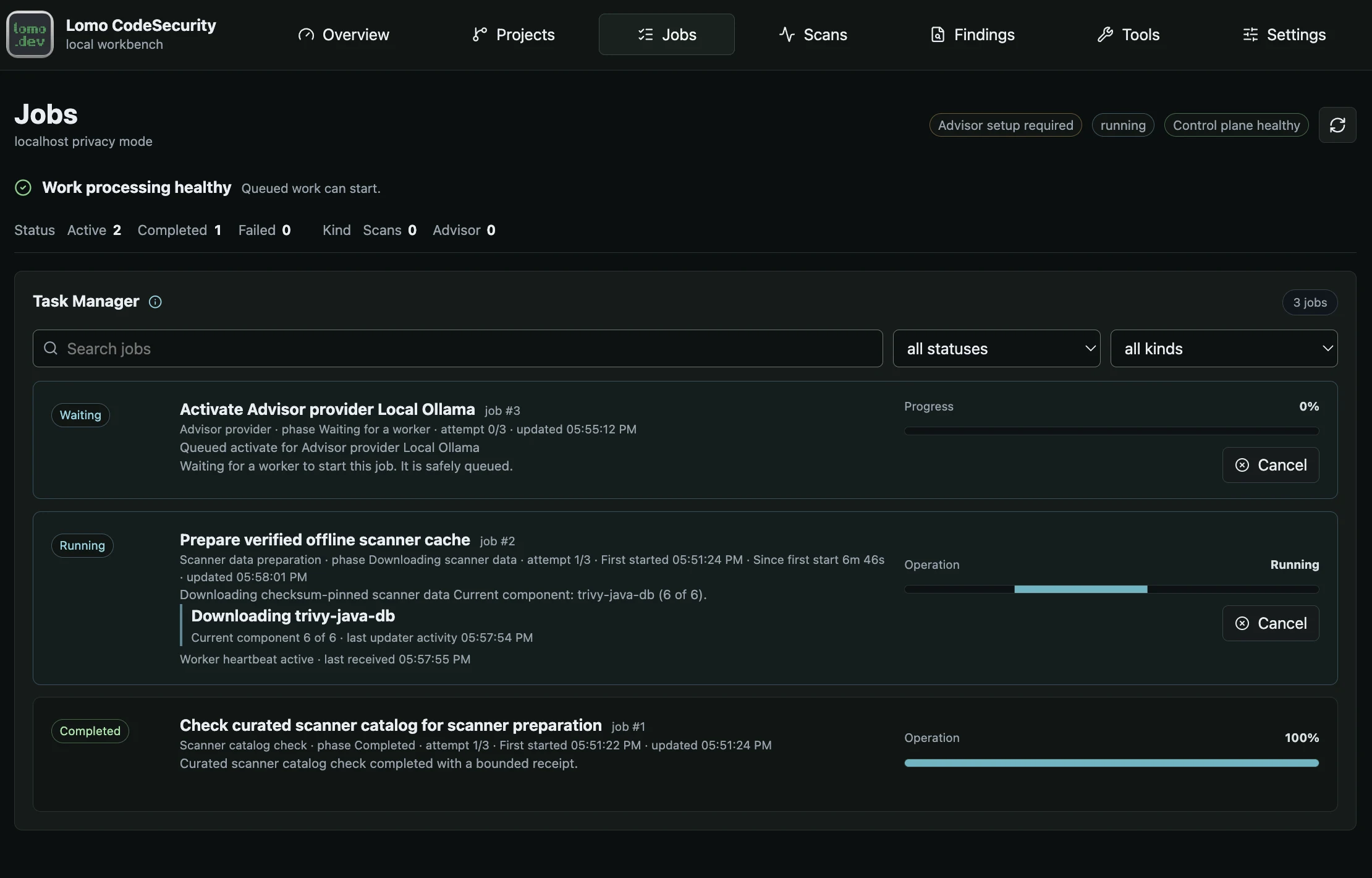
Jobs retain progress and terminal outcomes so work can be followed across navigation and reconnects.
Open the full imageOn first load, the view shows Loading job history and unavailable counts as dashes. No jobs yet and zero counts appear only after a successful empty read. History unavailable means the read failed. After a successful load, a later failed refresh preserves the displayed history and reports the error; use Refresh to reconcile it with persisted state.
Read status before elapsed time
| Status | What has happened |
|---|---|
| Waiting | The job is safely queued and waiting for a worker. |
| Assigned | A worker has claimed the job. |
| Running | The worker is performing the operation. Read its current stage. |
| Cancelling | Cancellation was requested and cleanup is still being reconciled. |
| Completed | The job recorded a successful terminal outcome. Open its result for the meaning of that outcome. |
| Failed | The job recorded a failure. Read the reason and currently eligible recovery actions. |
| Cancelled | The job recorded cancellation. Inspect any retained results and operation-specific effects. |
A completed scan job does not imply a passing policy gate. A completed cache outcome check does not turn the original failed preparation into a successful job. Follow the result link to the relevant scan, provider or scanner-data state.
A retry can retain the earlier attempt’s first-start time. The displayed time may therefore include earlier attempts and waiting between them. A queued retry is waiting for a worker even if it has an older heartbeat or activity value.
Interpret actual progress
Scanner-data jobs show the current updater stage, component and position, last activity, and byte progress when the source supplies a total. Verification and activation do not always have measurable totals. An indeterminate indicator means work is active without a reliable overall percentage or completion estimate.
Stages such as downloading, verifying candidate data, activating and saving the receipt describe different parts of one preparation. They do not each receive a new overall deadline. Refreshing the page, restarting a worker or retrying issued work does not reset the persisted preparation budget.
If Work processing unavailable appears, queued jobs remain durable. From the product checkout, use the supported startup command:
make upWait for worker health, then refresh the existing job. Inspect safe job details and the product’s make logs output when activity remains stale. Do not remove a scanner or recreate the database to make a progress indicator look healthy.
Request cancellation and wait for cleanup
Use Cancel on the exact job when the action is available. The product first persists your request, then waits for process cleanup and the terminal receipt. Closing the browser, progress panel or editor does not perform this action.
Cancellation can race with completion. In scanner preparation, it becomes unavailable at the activation or commit boundary and cannot undo an already activated verified generation. In remote Advisor work, it cannot recall content already received by the destination. Read the terminal result and current resource state rather than assuming all effects were reversed.
For a multi-root editor batch, cancellation of the current job leaves later roots unstarted. Each already-started root retains its own result. An uncertain job outcome also stops later submissions so that the batch does not run ahead of a missing result.
Retry only when the job offers it
Use Retry only on an eligible terminal job that exposes that action. A failure may instead have a blocked reason or a different recovery operation. Do not submit the same work again while its original job remains waiting, running or cancelling.
A preparation whose issued deadline has expired cannot gain more time by replaying the same command. Inspect its outcome, then start a new explicit preparation when the workflow offers it. Retry verification checks an unchanged cache target; it neither downloads replacement bytes nor repairs invalid data.
An uncertain scanner publication may offer Check cache outcome. This starts a separate read-only job with its own fifteen-minute bound. It cannot download, activate, roll back or prune data. The original preparation stays failed even if the check establishes that publication succeeded. Current scanner readiness still determines whether a scan can start.
Rejoin after a disconnect
Retain the exact job and command identities when the UI supplies them. Reopen Jobs and refresh the same resource after reconnecting. A missing active row, client timeout or HTTP 202 response does not establish a terminal outcome: 202 means the command was accepted.
API clients must also preserve the command’s idempotency key where the operation requires one. Accepted keys contain 8 to 160 ASCII letters, digits, periods, underscores, colons or hyphens and begin with a letter or digit. One key binds one exact command; reusing it with changed content can return a conflict.
After a timeout, reconcile the original command before minting a new key. The header is required by specified command routes, not every POST. Bulk finding actions require it for triage, rather than all lifecycle changes. Consult the exact operation page before constructing a request.
Continue with recovery for an uncertain result, scanner preparation for readiness, or jobs and evidence architecture for the relationship between admission, worker execution and published evidence.