Source preview guide · 0.1.0
Ask Advisor about a finding
Review optional Ollama advice against captured evidence, and confirm the exact disclosure before sending one finding to a remote provider.
Begin with a report you understand
Open a finding and read its scanner, rule, source location and evidence. Advisor can offer an explanation or suggested repair after that first review. It is optional: ordinary scans use the configured scanners and do not invoke AI.
The finding must belong to a scan with persisted results and a status of completed, partial or failed. Advisor is unavailable for a cancelled scan, even if that scan retains findings. If the report is suppressed, the workbench asks you to reopen it before requesting advice. Check the reason beside a disabled Run Advisor action instead of changing unrelated scan settings.
Advisor produces untrusted model output. It can misunderstand data flow, suggest an ineffective fix or repeat the problem. Its confidence is a model-generated value, not a measured probability that a finding is correct. The deterministic gate continues to use scanner evidence and your explicit lifecycle decisions.
Choose an eligible local model
Open Settings > Advisor and inspect Advisor Providers. The local model controls show detected Ollama models and distinguish locally stored weights from cloud-only entries. Select the model you intend to use and choose Use locally when it is eligible.
That action verifies reachability and the exact model digest, then records the same-device provider. It sends no finding content. The default local model is qwen3:8b; the choice is a starting configuration rather than an accuracy guarantee. An unavailable or unsuitable local model does not make a remote provider eligible for automatic fallback.
Provider configuration and current readiness are separate. If the service cannot reach the model, inspect the provider result and connection details before requesting another review. You can continue deterministic scanning and manual finding review without Advisor.
Run a local review
- Return to the exact finding in Findings.
- Choose Run Advisor and review the offered action.
- Follow the admitted Advisor job in Jobs or the finding’s progress state.
- Open the saved result and compare its reasoning and suggested fix with the captured evidence.
- Make any source edit yourself, save it and run a new scan to verify the result.
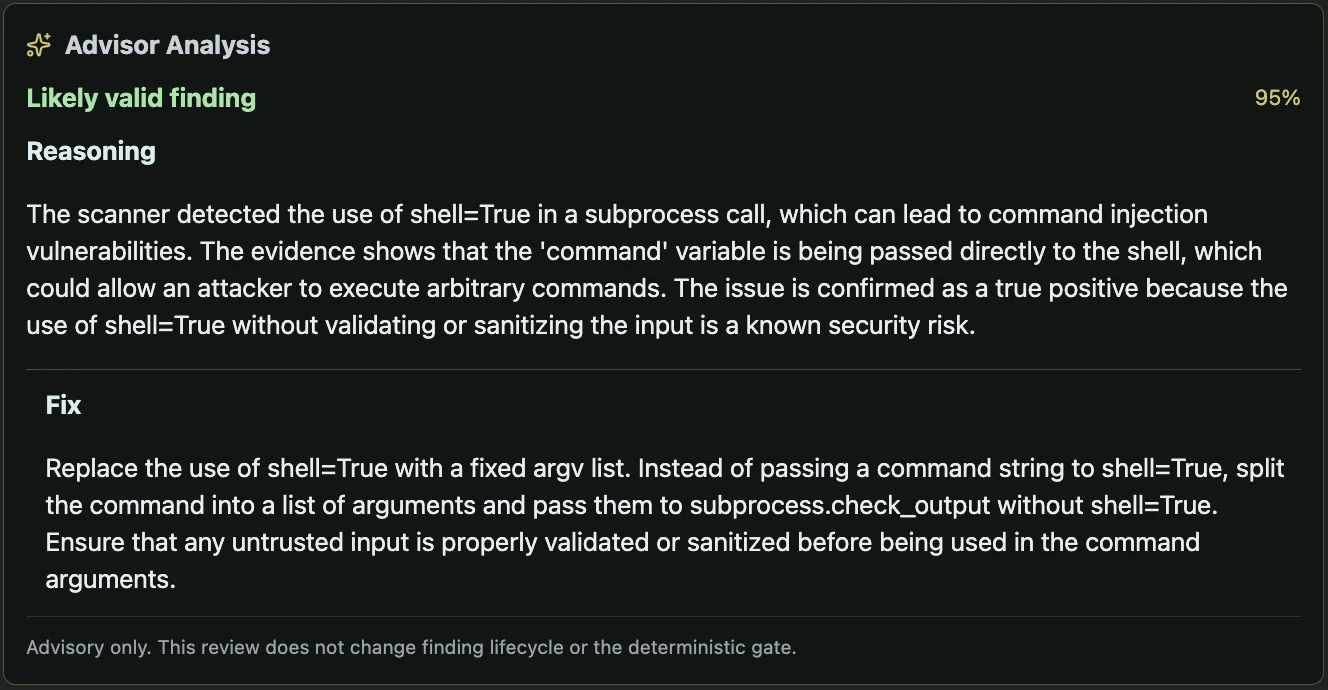
Advisor adds an explanation and suggested correction. The deterministic gate still decides whether evidence satisfies policy.
Open the full imageIn VS Code, Run Advisor is available from the finding’s context menu, source hover and Quick Fix menu. The native action asks for confirmation before requesting local model work. If remote review is needed, use the exact finding in the Web UI, where the full disclosure can be reviewed.
Opening a finding or hovering over it never starts Advisor. A result does not change the finding’s lifecycle, edit source or override a failing gate. Record your own lifecycle decision after reviewing the evidence.
Configure a remote provider deliberately
The provider form supports the documented Direct and SSH transports. Enter the intended destination and model, follow the product’s host-authorization workflow, then use the provider’s separate Test connection and Activate controls when offered.
Testing and activation send no finding content. An active, tested and authorized remote provider is still outside automatic, scan-wide and bulk routing. You choose it for one finding through the disclosure flow.
Keep the provider draft visible while resolving a failed read or save. Reload Settings retains an open Add/Edit form. If another client changed the provider collection, copy any edits you need, cancel the form and reopen the saved provider before deciding what to change. A stale form cannot overwrite the newer collection revision.
Review exactly what will leave the workstation
For a remote request, select the provider for the intended finding and inspect the fresh server-built disclosure. It identifies:
- The provider, destination and transport.
- The pinned model digest.
- The finding and its revision.
- The included content categories and bounded payload size.
- The confirmation hash that binds the preview to the request.
Read the actual preview rather than assuming that a redacted excerpt contains no sensitive information. Confirm only the disclosure you intend to send. If the destination, model, finding revision or packet changes, obtain and review a new preview.
- Start with the exact finding
Read its source, scan identity and revision before requesting another interpretation.
- Review provider and model
Configuration, authorization and current readiness are distinct. Automatic and scan-wide selection is local-only.
- Confirm remote disclosure when needed
A remote request needs a fresh single-finding preview bound to destination, model, finding revision and prompt content.
- Follow the admitted Advisor job
The worker and connector use the exact granted scope. Observe the retained result or cancellation outcome.
- Compare advice with the source
Treat a suggested fix and confidence value as model output. Make a deliberate change and rescan for new evidence.
The resulting job is tied to that confirmation. Automatic remote routing, a scan-wide request or a bulk selection cannot stand in for a one-finding disclosure. Provider setup alone is never permission to send source content.
Follow cancellation and concurrent changes
A job retains the selected finding revision and checks it before model work and before saving the answer. If a concurrent lifecycle change makes the result stale, the old answer is discarded rather than attached to the newer state. Refresh the finding before deciding whether another request is appropriate.
Use the exact job’s cancellation control when offered. Cancellation cannot recall content already received by a remote provider. For an SSH job, cleanup closes the product’s forward; the product does not create a reverse tunnel to the workstation. Wait for the recorded terminal outcome in Jobs.
A disconnected browser or closed progress panel does not prove the request was cancelled. Reopen the existing job before submitting a replacement. Advisor failure or cancellation leaves the scanner evidence and gate decision intact.
The Advisor reference documents provider and disclosure requests. Read jobs and evidence architecture for the durable command flow and recovery when the result cannot be established.